
- Open Anime Expeditions in Roblox and let the lobby finish loading.
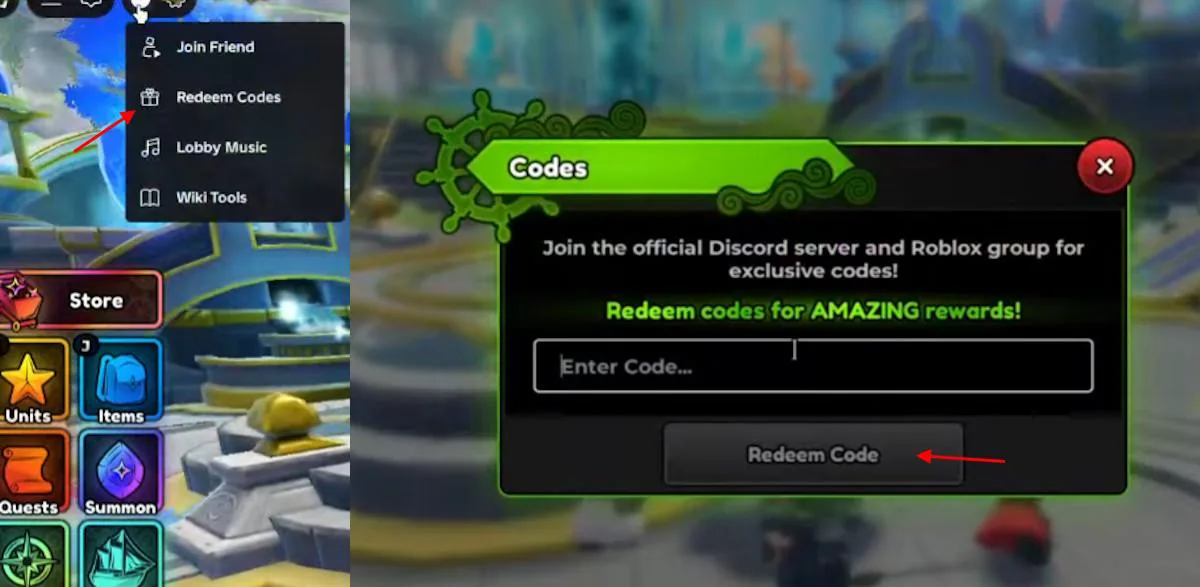
- Tap the three-dot icon at the top-left of the screen, then choose Redeem Codes from the dropdown.
- Type the code into the Enter Code… field exactly as shown and press Redeem Code.
Last checked against current official and established guide sources on July 22, 2026.
Anime Expeditions Codes
Active launch-window codes, rewards, and redemption steps.
8 Active Codes
The active list was refreshed after the July 22 code drop. Older launch and compensation codes that current sources mark as expired have been removed.
Last checked: July 22, 2026
Active Anime Expeditions Codes
| Code | Rewards | Status | Action |
|---|---|---|---|
HAPPYBDAYCOOP | 10 Trait Crystals | Active | |
wfade | 2,500 Gems, 50 Trait Crystals, 25 Equipment Rerolls, 25 Stat Rerolls | Active | |
100mvisits | 5,000 Gems, 50 Trait Crystals, 25 Equipment Rerolls, 25 Stat Locks, 25 Stat Rerolls | Active | |
100K! | 2,500 Gems, 50 Trait Crystals, 20 Stat Locks, 20 Stat Rerolls | Active | |
30KLIKES! | 2,500 Gems | Active | |
EXPEDITIONS | 30 Equipment Locks, 30 Equipment RerollsExpeditions mode must be unlocked | Active | |
AE#1 | 500 Gems, 5 Equipment Locks, 5 Equipment Rerolls, 5 Stat Locks, 5 Stat Rerolls | Active | |
RELEASE | 2,500 Gems, 50 Trait Crystals | Active |
How to Redeem Anime Expeditions Codes
Why Is My Anime Expeditions Code Not Working?
Codes expire without notice, and the active list rotates when updates ship or a partner event ends. When a code fails:
- Check spelling and case. Codes are case-sensitive; copy directly from the table above with the Copy button instead of typing by hand.
- Confirm the code is still active. The active list on this page is updated on each verification pass; expired entries are removed as soon as they are confirmed inactive.
- Restart the game client. If the launcher cached an older build, the redeem popup can reject current codes.
- Switch server or rejoin. Leaving the current server and rejoining Anime Expeditions from Roblox reloads the code service.
- Check gated-code requirements. The
EXPEDITIONScode requires Expeditions mode to be unlocked before it can be redeemed.
If the code still rejects after these checks, the only reliable fix is waiting for the next verified update on this page or checking the official Anime Expeditions Discord announcement channel.